Microsoft is phasing out SMS, voice and security questions as native authentication and password recovery methods in Microsoft Entra ID, pushing organizations towards phishing-resistant alternatives.
Passkeys are now the default option for authentication, but the main changes begin on February 1, 2027, when Microsoft-provided SMS and voice authentication will be retired for most users. Security questions will follow in March 2027, removing another long-standing option from self-service password reset (SSPR).
While the move aims to strengthen identity security, it also creates challenges for organizations with employees who cannot easily use the supported methods. Businesses relying on traditional verification methods must now rethink how employees authenticate and reset passwords.
How Organizations Can Retain Flexible Password Resets
For desk-based employees, moving to the supported multi-factor authentication (MFA) and SSPR should be relatively straightforward. But for many manufacturers, construction firms and other frontline roles, the supported methods aren’t always practical.
If an organization cannot move every employee to Microsoft's supported recovery methods, third-party identity verification and password reset tools offer another option. Specops provides two solutions designed to maintain flexible recovery processes alongside robust identity verification.
Flexible Self-Service Password Reset
Specops uReset enables employees to reset Active Directory and Microsoft Entra ID passwords from any location, device or browser, without requiring a corporate VPN connection.
For Active Directory environments, it can also update locally cached Windows credentials, helping employees regain workstation access. And unlike Microsoft's native SSPR, Specops uReset supports additional verification methods, including one-time passwords (OTPs) and security questions.
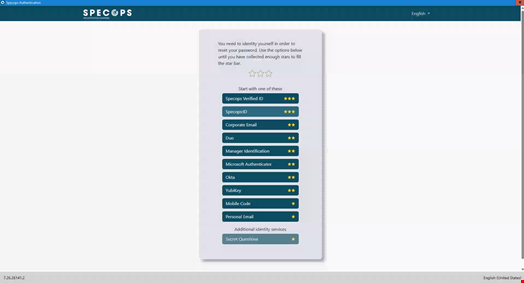
Organizations can combine multiple checks, such as requiring an OTP followed by security questions, rather than relying on a single verification method. This provides a way to retain familiar recovery options for employees who cannot use Microsoft's remaining methods.
Secure Service Desk Identity Verification
When employees cannot reset their own passwords, they often turn to the IT helpdesk.
However, password resets and account unlock requests are attractive targets for social engineering attacks, particularly when attackers impersonate legitimate employees.
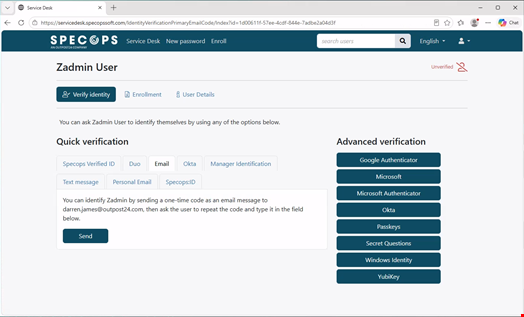
Specops Secure Service Desk helps agents verify callers before approving password resets or account unlocks. Like Specops uReset, it supports layered verification like combining OTPs with additional checks such as security questions. Verification events also integrate into security operations workflows, providing visibility for monitoring and investigations.
Why is Microsoft Retiring SMS, Voice and Secret Questions?
Microsoft began enabling passkeys by default for users configured for SMS or voice authentication on September 1, 2026, prompting them to register during MFA sign-in. The timeline applies to Microsoft Entra ID public cloud environments. Other cloud environments have separate schedules.
Microsoft is retiring these methods because they provide weaker protection against phishing and account compromise. SMS and voice authentication are vulnerable to attacks such as SIM swapping, while security questions can be guessed or exploited through social engineering.
What Authentication and SSPR Options Remain?
Microsoft recommends phishing-resistant methods such as passkeys, including FIDO2 security keys, and Windows Hello for Business. Microsoft Authenticator also remains available for MFA, using push notifications and one-time codes.
For SSPR, organizations will have fewer native options once the retirements are complete:
- Microsoft Authenticator push notifications
- Hardware OATH tokens (currently in preview)
- Software OATH tokens
- Email one-time passcodes
Notably, passkeys and Windows Hello for Business are supported for authentication but are not native SSPR verification methods. This distinction matters for organizations with frontline workers, shared workstations or employees without smartphones.
Hardware security keys can help address some authentication challenges. However, businesses must also consider device compatibility, distribution and the process for when a key is lost, including replacement costs.
Can Organizations Keep SMS and Voice Authentication?
Technically, organizations can retain SMS or voice authentication, provided they have a legitimate business, regulatory or technical requirement. Through the Microsoft Security Store, organizations can contract with supported third-party telephony providers, with configuration availability beginning October 30, 2026.
However, this introduces additional vendor agreements, usage costs and administrative responsibilities. The arrangement also does not preserve security questions within native Entra ID SSPR.
How IT Administrators Should Prepare
With the first major retirement deadline approaching, administrators should identify affected users and test alternatives before February 2027. Key actions include:
- Audit authentication policies: Review Entra ID authentication methods, legacy MFA settings and SSPR configurations. Microsoft provides a PowerShell script that identifies users enabled for SMS and Voice in Entra ID.
- Prioritize phishing-resistant authentication: Where practical, pilot passkeys, FIDO2 security keys and Windows Hello for Business with different employee groups before wider deployment.
- Review recovery requirements: Identify employees who cannot use registered devices or Microsoft's remaining SSPR methods.
- Prepare employees and service desk teams: Communicate registration requirements, provide training and establish secure fallback procedures.
- Test account recovery: Validate password resets and account unlocks across different devices, locations and network conditions, including lost-device scenarios.
Ensure All Your Users Can Securely Reset Passwords with Specops
Microsoft's move towards phishing-resistant authentication reduces reliance on methods vulnerable to social engineering. However, not every employee can, or wants to, move to passkeys and authenticator apps.
For businesses with diverse workforces, solutions such as Specops uReset and Specops Secure Service Desk can help bridge those gaps without depending entirely on Microsoft's shrinking set of native recovery options.
If you’re looking to maintain flexibility for your workforce SSPR, book a demo with Specops to see how our solutions could help.