Remote and hybrid work have changed how and where users authenticate. Devices aren’t always connected to the corporate network and VPN use is often inconsistent. Crucially, not every password reset happens while a machine has line-of-sight to a domain controller.
Identity drift occurs in this gap, when a user’s credentials aren’t fully aligned across every system that can authenticate them. Understanding how these credentials persist is critical to closing gaps that attackers are quick to exploit.
How Old Passwords Create Identity Drift
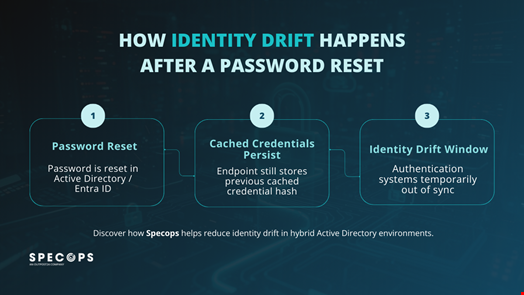
When a password is reset in Active Directory (AD) or Entra ID, the directory updates instantly, however endpoints don’t. Windows stores cached credentials locally as password hashes to allow users to log on when they’re offline. Those cached credentials remain valid until the user next authenticates against a domain controller with the new password.
If the old password has already been exposed, it can still be used in certain attack paths. Attackers target cached hashes with techniques like Pass-the-Hash, and previously compromised credentials might remain viable for longer than expected.
In organizations using Entra Connect with Password Hash Synchronization, a password reset in on-prem AD doesn’t invalidate the old credential in Entra ID straight away. Until the next cycle completes, typically within two to five minutes, the previous password may still authenticate against cloud resources. While these delays seem minor, they create a risk window in which identity state isn’t consistent across systems.
Why Cached Credentials Must Update Immediately
Some self-service password reset solutions, such as Specops uReset, address this directly. When combined with the Specops Authentication Client, if a user is asked to perform a self-service reset, the cached credential store is immediately updated on the client machine regardless of whether it can communicate with Active Directory or Entra ID. That update does two important things:
- It invalidates the previous cached credential on the endpoint used to perform the reset.
- It reduces the risk of Pass-the-Hash or reuse attacks against that device.
However, this doesn’t eliminate identity drift everywhere. Other machines that the user has previously logged in on will still hold cached credentials until the next successful authentication with the new password, whether over VPN, through Remote Desk Protocol, or physically sitting at the machine.
But in practice, laptops and frontline business systems are often the most exposed assets, so targeting them first still makes a difference. Instead of waiting for users to reconnect to the network and “naturally” refresh their credentials, updating cached credential stores as part of the reset process actively reduces the opportunity for an attacker to continue using a known password or hash.

Limiting Risk with Multi-Factor Authentication (MFA)
When a password is reset following a leak or breach, administrators often assume the risk has been contained. In reality, the effectiveness of that reset depends on where and how the credential has been cached, and whether that process has fully completed across AD, Entra ID, and endpoints. Without a clear understanding of this, incident responders can overlook systems where old credentials remain usable.
In environments without MFA, a password reset can leave several possible states in play:
- The user has logged in with the new password while connected to the directory, updating the cached credential store.
- The user has not yet performed a connected login, meaning the old password (and NTLMv2 hash) could still be accepted locally or leveraged in Pass-the-Hash scenarios.
- In hybrid environments using Password Hash Synchronization, the reset has occurred in Active Directory but the new hash hasn’t updated in Entra ID, leaving a short window where the previous password may still authenticate to cloud resources.
From an attacker’s perspective, any one of these states is an opportunity. Captured hashes (via tools such as Responder), dumped credentials from compromised machines, or even exposed AD backups all extend the impact of a single leaked password if additional controls aren’t in place.
MFA helps by preventing a password from being sufficient on its own to compromise an account. An attacker would also need the additional authentication factor, reducing the likelihood of successful exploitation during the drift window.
Although MFA doesn’t eliminate the need to manage cached credentials or improve reset workflows, it does ensure that a timing delay doesn’t become a full account compromise.
Reducing Identity Drift In Your Organization
Identity drift is a byproduct of how credentials are cached and synchronized. Microsoft is aware of the issue but has no plans to change functionality as it may cause compatibility issues with many applications.
As such, organizations looking to reduce risk must tighten every layer of their password reset process:
- Enforcing strong password policies (following regulatory guidance, such as that outlined by NIST).
- Blocking weak and known-breached passwords using an up-to-date compromised credential corpus.
- Updating cached credentials as part of the reset workflow.
- Requiring MFA wherever possible to prevent single-factor compromise.
Specops help improve identity security posture with solutions tailored to both on-premises and hybrid environments. We work with organizations to strengthen password controls, improve reset workflows, and enforce MFA in ways that reduce identity drift without adding operational friction.
Interested in seeing how Specops could work in your organization? Contact us or book a demo to see our solutions in action.