The Offline Storage Table (OST) file is a local copy of your mailbox items and is created when you configure your Outlook via an Exchange Server, Microsoft 365, or IMAP account, with the cached mode enabled.
This Outlook data file lets you access your mail items even when there is no internet or server connectivity. You can even draft emails and delete mail items when offline.
The OST file is linked to the user profile in which it is created, which means it cannot be opened or imported into any other profile. So, if you want to migrate or export OST file data to a new/another email account, you need to convert the file into PST – an Outlook data file format that can be opened or imported into any Outlook profile.
Though you can convert your OST file to PST by using the Import/Export feature in Outlook, it will only work when your Outlook is working and the profile, in which the file is created, is accessible. In this post, we will explain how to convert OST to PST without Outlook for free.
Common Scenarios where you need to Convert OST to PST
Let’s first take a look at some scenarios where you have to convert your OST file to PST format.
1. Email Account is Deleted: If your email account or profile is deleted, the associated OST file becomes inaccessible or orphaned. You cannot directly open or import such a file into another profile. In this situation, you have to convert it into PST file to recover your data.
2. Server Crash or Downtime: If the mail server crashes or goes offline, you will lose connection to your mailbox on the server. While Outlook allows you to access the mailbox data offline, you cannot transfer this data to another profile while the server is down. This situation requires you to convert your OST file to PST.
3. Migration of Data: When you need to migrate OST file data to another profile or a Microsoft 365 account, then the easiest way is to convert the file to PST to transfer the data.
4. Splitting/Backing up Large OST File: If your OST file becomes large, it can cause Outlook performance issues and synchronization errors. You can convert and split the OST file data into smaller PST files.
How to Convert OST File to PST without Outlook for Free
The only way to convert OST to PST without Outlook is by using a specialized OST to PST converter. Though there are several such converters available on the internet, you can go for the Online OST to PST converter by Stellar – a renowned name in data care domain. This web-based converter can easily and effectively convert OST file of <=500MB to PST absolutely free. It doesn’t require Outlook or any other additional software installation. Its Premium version can convert OST file of up to 5GB.
Let’s take a look at some of the benefits of this online OST converter:
- It has a clutter-free interface that facilitates OST conversion in a few simple clicks.
- It maintains complete data integrity and original folder structure after conversion.
- It also offers an option to preview the mailbox structure in HTML format after conversion.
- There is no Exchange Server connection required.
- It shows real-time progress of the conversion process.
- There is complete data privacy and security as the files (both OST and PST) are deleted from their servers.
- It also supports conversion of password-protected OST files.
- It seamlessly works on all major browsers, including Chrome, Firefox, Microsoft Edge, and Safari.
How to Convert OST to PST using Stellar’s Online OST Converter
Converting the OST file to PST using this converter is a simple and straightforward process. First, launch any web browser on your device and then follow these steps:
- Go to the stellar official website of Online OST to PST Converter.
- On the main page, click Convert OST File. It will direct you to create an account.
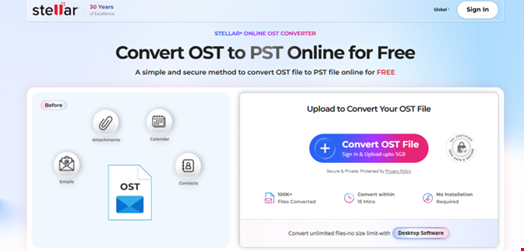
- After creating the account, upload your OST File (<=500MB for free conversion) that you want to convert to PST.
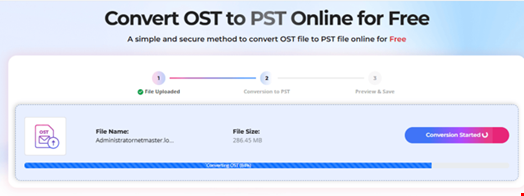
- When the file is uploaded, click on the Start Conversion button.
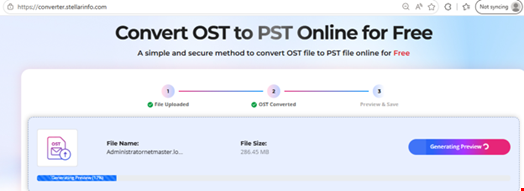
- Once the process is complete, you will see the “Your OST file has been successfully converted” message. Click Save PST File to download the converted file.
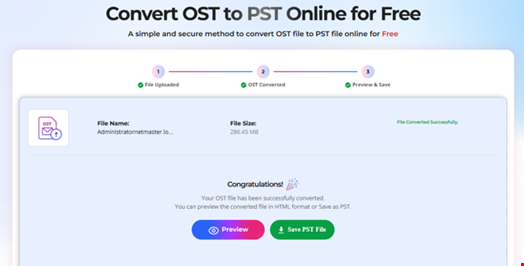
You can preview your mailbox items count and folder hierarchy in HTML format.

You can check the default Download folder on your system for the converted PST file.
Conclusion
You may need to convert your OST file to a PST file due to several reasons. An easy and convenient way to convert your OST file without Outlook for free is by using the Online OST Converter by Stellar. For converting OST file without any file size limitations, you can use the desktop-based tool - Stellar Converter for OST. This tool can convert OST file of any size to PST and various other file formats, such as MSG, EML, RTF, HTML, or PDF. It also offers various advanced features, such as auto-split large PST file, save individual mail items, convert multiple OSTs in a batch, export OST data to Microsoft 365, and others. You can download this tool for free on any Windows system to evaluate its functionality.