
A new phishing scam that presents a fake Bank of America message is being used by cybercriminals to gain remote control of victims’ users.
Identified by cybersecurity firm Huntress, the fake message imitates the bank's visual style, layout and branding, all the way from the initial phishing email to the eventual webpage that victims are redirected to.
The messages were sent to the Huntress honeytrap account on July 28. It prompted the recipient to visit what it claimed to be the bank’s website.
However, a link to what is purported to be the “Security Centre” actually delivers a Visual Basic script which, when executed, begins a multi-stage chain of decoding complex content and leads to the download of a ScreenConnect installer.
The emails did not point to Bank of America's legitimate domain, but to bkofamerica[.]com. The link in the message pointed, again, not to Bank of America, but to kleinschnitg[.]com, which then opened a page on sectioncompil[.]com from which the malicious zip originated.
The researchers noted that the attack has been set up differently for victims using different types of devices.
There is no payload for Mac users, instead they were prompted to submit any piece of valuable personal information they might possess.
If a Windows browser was used by the target, they were prompted to download and install “Account Guard”, which the page described as "a powerful tool designed to protect your financial data, prevent unauthorized transactions and other cyber threats."
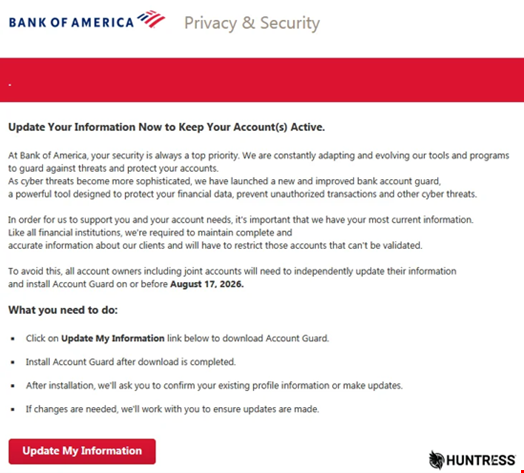
Clicking the "Update My Information" button on the page delivers a file named AccountGuardSetup.zip, which contains a Visual Basic Script (AccountGuardSetup.vbs) file.
Running the .vbs file leads to the installation of the ScreenConnect RMM on the target system.
This allows the attacker to elevate its own privileges silently through the use of a C# script that invokes the ICMLuaUtil COM interface UAC bypass.
Each stage contains large Base64-encoded data blobs that decodes into additional scripts, ultimately leading to a PowerShell payload. That final script downloads a 17MB Base64-encoded installer from UploadToURL.com, decodes it, and writes a ScreenConnect MSI package to the victim's system.
To evade detection, the malware disguises ScreenConnect as a service called "Windows Security", removes traces of its installation, hides related files and services using Windows permissions, and prevents normal uninstallation.
Once ScreenConnect is installed, it connects to the suspected command-and-control (C2) server at 217.60.195[.]167 over TCP port 8041 and awaits commands from the threat actor.
The IP address geolocates to the United Arab Emirates and is reputationally challenged, given that several other malware families appear to use this address as a C2.
“The simplest way to mitigate an attack like this is to pay close attention to where an email comes from, and where any links point,” Huntress said in its analysis.